
 PteroStats is a Discord App/Bot by ZN Project Development that checks your Pterodactyl or Pelican panel stats and posts them to your Discord server. It keeps a stats message in a channel up to date, so your community can see panel and node status without opening the panel.
PteroStats runs on your own server and reads your panel with a Client API key. Everything it posts is configured in
config.yml.
What you can do
Show panel and node stats
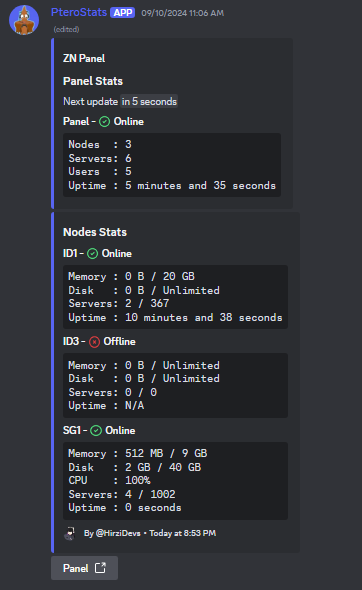
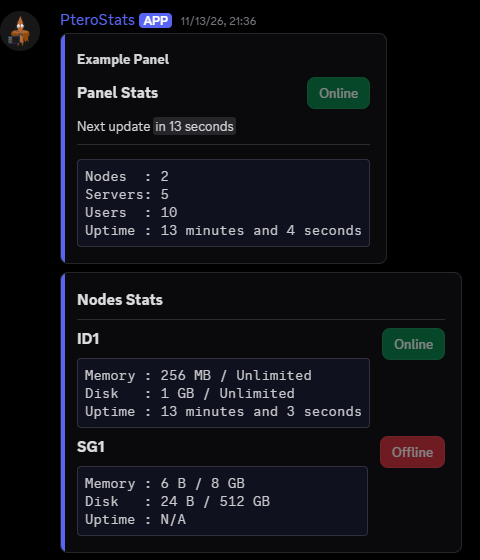
PteroStats refreshes the stats message on a set interval (10 seconds by default). It can show:- Panel status, uptime, and host.
- Total servers and users on the panel.
- Each node’s online or offline status and uptime.
- Node details such as memory and disk usage, in bytes or as a percentage.
- Server counts and node host per node.
Customize the message
- Change the embed author, title, description, color, footer, thumbnail, and image for both the panel and nodes sections.
- Add link buttons, such as a link to your panel or dashboard.
- Set the bot’s presence text, activity type, and status.
- Replace the online and offline labels with custom emoji.
Choose which nodes appear
Keep internal, test, or retired nodes out of the stats message with the node blacklist, and set a limit on how many nodes are displayed.Get downtime alerts
Turn on the notifier to post an alert to a Discord webhook when your panel or a node goes down.Getting started
Node.js 18 or newer is required.
- Create your Discord App/Bot.
- Invite your Discord App/Bot to your Discord server.
- Create a panel API key and find the channel ID where stats should be posted.
- Install PteroStats with one of the methods below.
- Start PteroStats and answer the setup questions in the console.
Egg (recommended)
Install on your Pterodactyl or Pelican panel.
Manual
Run with PM2 or the nodejs-generic egg.
Docker
Run with Docker Compose or Docker Run.
Reporting a bug
- Set
log_errortotrueinconfig.yml. - Check the console for the error message.
- Report it in the support server and include the
logs.txtfile created by the bot.
Important notes
- PteroStats can only read what the API key you provide has access to. Create the key from an account with administrator access to the panel.
- Application API keys are deprecated for PteroStats. Use a Client API key.
- Never share your API key, bot token, or webhook URL.
- PteroStats is an independent project and is not affiliated with or endorsed by Pterodactyl or Pelican.